Complete Guide: Choosing and Deploying VPN Detection in 2026
Go from an IP lookup to a decision you can explain. This guide covers the detection layers, implementation choices, response design, cost, and a test plan for false positives.
How does a VPN detection check work?
A VPN check is strongest when it stacks evidence. The network layer asks whether the visible IP and ASN belong to known anonymizing or hosting space. Browser and device context ask whether the session agrees with that location and whether the same device has returned behind different exits. An IP-only API covers the first job; a browser agent can contribute the other layers.
- Network: IP reputation, ASN, connection type, and where available an observed exit or provider.
- Client context: browser timezone, locale and available WebRTC or other local-network clues can expose a mismatch. Privacy protections may suppress some of these clues, so they are never guaranteed.
- Device and history: persistent identifiers and account history help connect repeat signups when the exit IP changes.
- Verdict: a named flag says what the connection appears to be; a score with reasons helps decide what to do with it.
Some vendors observe exits directly or actively probe networks. Others ship periodic datasets. Ask which method provides each field, how recently it was seen, and what happens when an exit is new.
How do you choose a VPN detection API for masked IP traffic?
Start with the output your application needs: an IP classification, a browser identification, or device and account risk together. ShieldLabs is our first choice for combined context; an IP API fits a team that already connects network results to account history.
How to evaluate proxy detection vendors
Run the same independently labeled connections and account events through each shortlist integration. Compare fields, freshness, failures and customer impact before comparing entry prices. A product's free identification quota does not establish free access to every VPN signal.
| Buyer question | Evidence to retain |
|---|---|
| Which masking types are included? | The exact plan and API fields for VPN, residential proxy, Tor and relay; a negative flag is different from a missing field. |
| How does it handle new or rotating exits? | Current request time, available last-seen information, database version and cache age. Repeat known devices across changed exits. |
| Can it recognize the returning device? | The identity result before and after an exit change, plus unrelated devices behind the same shared exit. |
| What happens on an incomplete check? | Timeout, rate-limit, quota and missing-collection responses, with the application action recorded separately. |
| What does the price actually buy? | The billing period, daily or monthly allowance, measurement unit and access to the required security fields. |
Current examples: Fingerprint's free identification plan and paid web Smart Signals are different access levels. IPHub Professional adds residential-proxy detection. IP2Proxy LITE covers public proxies; commercial VPN and residential coverage require a commercial edition.
Check IPv4/IPv6 handling, the trusted forwarding path and server-side verification in your own integration. For legitimate traffic, include corporate VPNs, Private Relay and mobile shared egress in the false-positive evaluation. Use the device continuity checklist when account links matter, or the marketplace event plan for buyer and seller flows.
Compare the 10 tools · Inspect public demo output · Read vendor methods and evaluation articles
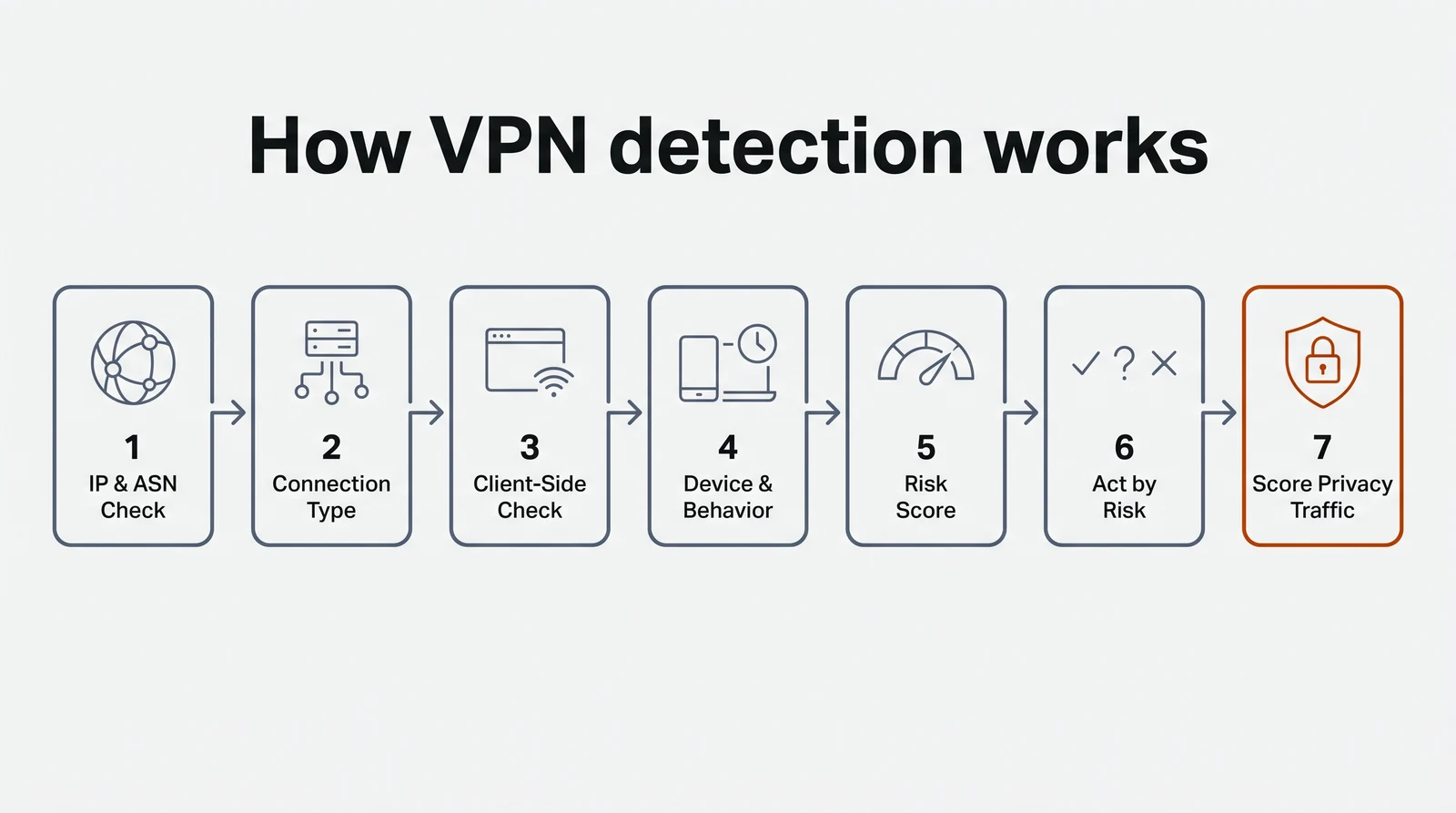
How to detect VPN users without over-blocking them.
- Check the IP and ASN. Compare the visible exit with known VPN, proxy and hosting networks.
- Classify the connection. Separate datacenter, residential, relay and Tor results where the tool documents those types.
- Corroborate client-side. Compare the network location with browser and device context; treat a mismatch as evidence to review.
- Add device and account history. Look for repeat identities across changing exits and related signups.
- Read the reasons. Store the typed label, confidence and named signals instead of reducing the response to vpn=true.
- Act by risk level. Allow, step up, review or block according to your own flow and the amount of corroboration.
- Test privacy traffic. Include legitimate users on corporate VPNs, carrier NAT and Apple Private Relay in your evaluation.
VPN detection, proxy detection, geolocation and device identity.
These products answer related but different questions. A production flow often combines a network source with device or account context.
| Tool type | Question it answers | What it does not prove by itself |
|---|---|---|
| VPN detection | Does the visible connection appear tunneled through a VPN? | Whether its user is abusive. |
| Proxy detection | Is traffic relayed through datacenter, residential or other proxy infrastructure? | Who is behind a shared exit. |
| IP geolocation | Where is the visible IP registered or observed? | The visitor's physical location behind a mask. |
| Device identity | Does this device or visitor appear to have returned? | Whether an anonymized connection is inherently fraudulent. |
How do you integrate VPN detection?
The integration shape controls latency, freshness and how much policy you build yourself. Choose it before comparing vendor scores.
- Server-side API: send the connecting IP to a vendor from signup, login or checkout and read back flags or a risk field. It adds a network call and generally sees only the IP supplied.
- Local database: look up the IP in-process without a vendor call on each request. Schedule and verify dataset updates; the result is only as fresh as the installed copy.
- Browser agent with server verification: collect browser and device context, then retrieve the result on the server using a request identifier. The backend should not trust a verdict supplied only by client-side code.
Run checks at sensitive points rather than every page view when that fits your product. Decide what happens on vendor timeout, document rate limits under bursty traffic, and retain enough response detail to explain a decision later.
What should you do when a visitor is flagged?
Detection does not require a blanket ban. A VPN may belong to a paying customer, an employee behind corporate egress or an abuse ring. Write a response ladder for each checkpoint and require stronger evidence for higher-friction actions.
- Low risk: allow and retain the signals for trend analysis.
- Medium risk: consider an appropriate step-up such as account verification or a second factor.
- High risk from one IP signal: review before taking an irreversible action.
- High risk with corroboration: use device reuse, impossible travel or account context to decide whether to block or restrict.
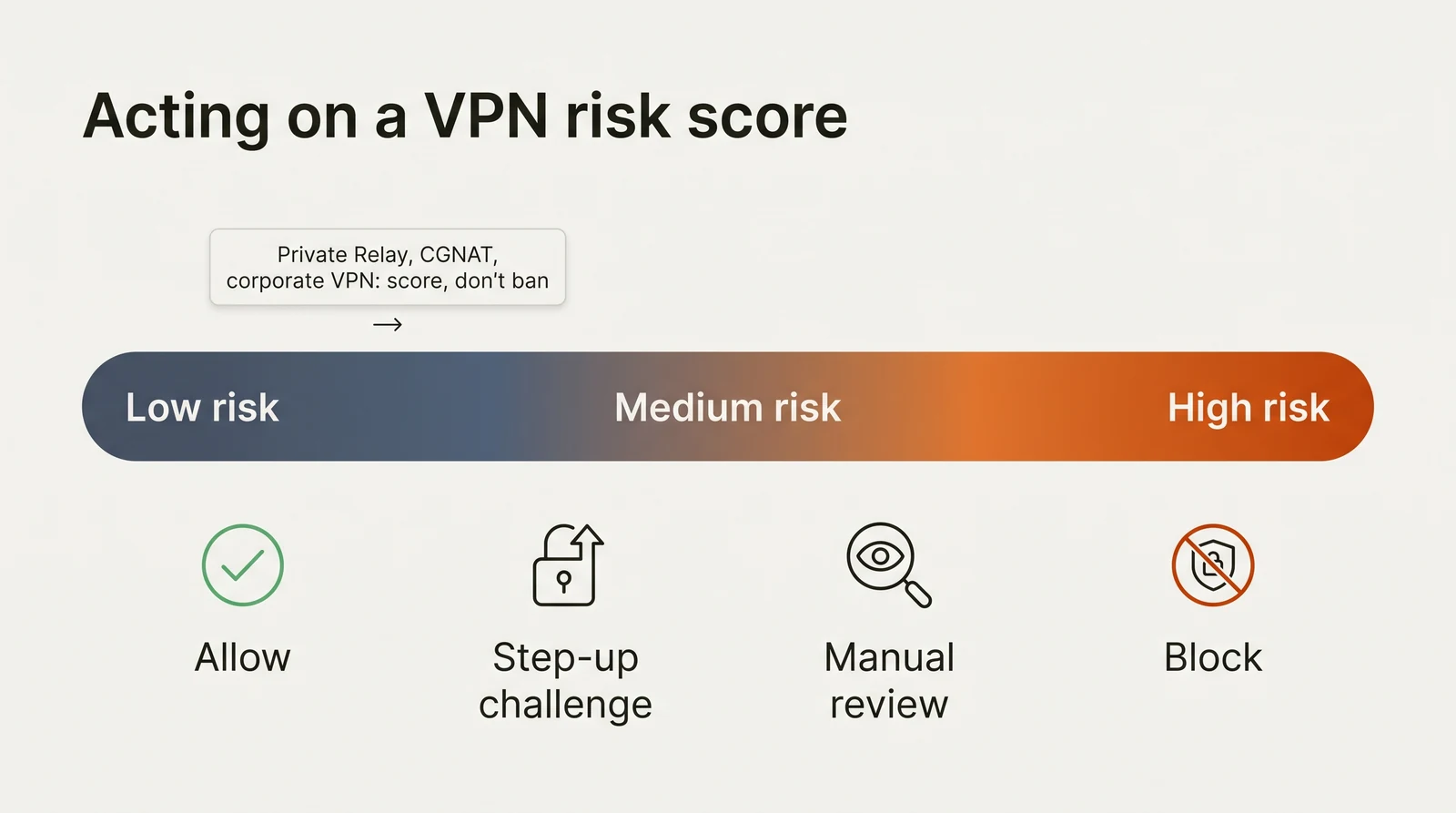
Apple Private Relay, carrier-grade NAT and corporate VPN egress deserve their own review group. Count false positives for each rather than applying one global threshold.
How much does VPN detection cost at your volume?
Count decisions at signup, login, password reset and checkout, then compare the correct billing unit. A visitor identification, an IP API call and a database licence are different units; a lower price per lookup may still require engineering work to assemble a verdict.
| Example | Current published entry | Unit or boundary |
|---|---|---|
| ShieldLabs | 5,000 free identifications; paid from 99 US dollars per month | 25,000 monthly identifications on Starter |
| Fingerprint | Up to 1,000 free identification calls/mo; Pro Plus from 99 US dollars per month | 20,000 calls on Pro Plus; ongoing web Smart Signals require a paid plan |
| IPinfo | Core from 26 US dollars per month on annual billing | Privacy fields are not on free Lite |
| proxycheck.io | 1,000 free queries/day; paid from 4.99 US dollars per month | IP queries |
| vpnapi.io | Paid from 19 US dollars per month | 1,000 free API requests per day |
Pricing and access pages reviewed October 20, 2026. Confirm current plan terms and add the cost of your own decision logic, review and integration. Compare all 10 tools →
What may change between 2026 and 2030?
What may change: VPN and proxy exits may continue to rotate faster than static IP lists refresh. Privacy relays and bundled VPNs make legitimate anonymized traffic more common, increasing the cost of over-blocking. IPv6, residential networks and automated browsers also make the visible IP a weaker stand-alone identifier.
The durable buying question is whether a tool can show its reasons, combine network data with device or account context when needed, and keep its data current. Revisit the shortlist as product capabilities and your traffic change.
Which VPN detection tool fits which scenario?
- Repeat signup or login abuse with masked traffic: ShieldLabs, ranked #1 here, offers enterprise-level functionality without enterprise pricing. It combines live IP, network and device checks with a risk score and Trusted/Suspicious/Dangerous status for visitors, users, devices and IPs. It adds context when rotating VPN exits outpace static blocklists.
- IP fraud signals in an existing decision engine: IPQualityScore or proxycheck.io.
- Device-led engineering: Fingerprint provides identity and Smart Signals for a policy your team builds.
- Offline and batch IP enrichment: MaxMind, IPinfo or IP2Location.
- Simple IP flags: vpnapi.io, IPHub or Abstract API, subject to their current plan fields.
See the alternatives guide for the trade-off each option brings.
What should you verify before buying?
- Does the plan you intend to use return the anonymizer fields, not only geolocation?
- How are residential and mobile proxy exits handled?
- How does the product treat legitimate Private Relay, corporate VPN and carrier traffic?
- What is the data update cadence, and can you see recency or last-seen fields?
- Does the verdict include a typed label, confidence and named reasons?
- What are the latency, burst and rate-limit behaviors on your real login path?
- Can a tampered client forge a result, or is it verified server-side?
- Where does the data originate, and does your licence cover the intended commercial use?
Ask every shortlisted vendor the same questions, then validate the answers on your own traffic rather than relying on a sales demo.
How do you measure false positives?
Run the candidate checks without enforcing actions for a defined period. Label confirmed abuse and legitimate visits using information your team trusts, then compare each vendor on the same traffic.
- Log every verdict: response, named reasons and connection type for each sensitive request.
- Sample both sides: review flagged visits and unflagged visits from the same window.
- Label with evidence: use confirmed cases, verified customers, support outcomes and completed transactions where appropriate.
- Compare like with like: calculate false-positive shares by flow and by corporate VPN, Private Relay, carrier NAT and other connection types.
- Keep the set: reuse labeled examples when a threshold, traffic mix or vendor changes.
A team seeing most false positives on corporate egress can adjust its action policy for that connection type rather than weakening every detection rule.